

WordCraft
An open-source word processor — reads/writes .docx with track changes, styles and scholarly references.
Note: Please open in the PC Client. Go to download >>>
Features
System Requirements
Minimum 4GB RAM. Low storage requirement (1GB reserved).
macOS 15+: Supports both Intel and M-series chips.
Windows 10/11 64-bit: No specific GPU requirements.
Screenshots
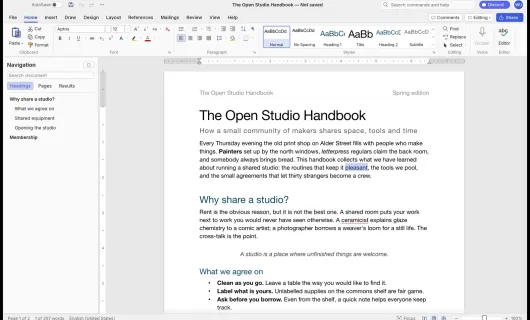
Introduction
Note: this page only catalogs third-party open-source projects and links to their official repositories; it neither develops, hosts nor distributes any software and assumes no liability. These are independent, open-source works written from the ground up, unaffiliated with and not authorized by any third-party commercial software or its maker; any third-party names, formats or trademarks are referenced for interoperability and description only.
WordCraft is a free, open-source word processor, written from scratch in Rust, giving you the familiar writing and document-layout workflow. Great for documents, reports, papers and handbooks.
What it lets you do:
- A familiar authoring UI: a ribbon, styles gallery, rulers and a Navigation pane — anyone who has used a mainstream word processor can pick it up right away.
- Compatible with common document formats (.docx): open and save this kind of document so it interoperates with other people's existing files.
- Full professional features: tables, track changes and margin comment balloons, automatic table of contents, footnotes, citations (APA/MLA/Chicago/IEEE), index, captions, mail merge, and spell/grammar checked as you type.
Product highlights:
- Native, pure Rust from desktop all the way to the browser, with no office-suite cloud dependency.
- Agent-drivable via CLI and MCP for automated document generation and processing.
Team & tech: built by the community ArtCraft team (GitHub user storytold, site getartcraft.com); the Craft series is 100% pure Rust with an egui UI, an independent open-source work unaffiliated with any third-party commercial software.
Platforms: macOS, Windows, Linux, BSD, and a browser (WebAssembly) build.