

HandBrake
The long-standing open-source transcoder — discs and files to MP4/MKV/WebM with software and hardware codecs, rich filters, presets and a batch queue
Note: Please open in the PC Client. Go to download >>>
Features
System Requirements
Minimum 8GB RAM. Low storage requirement (1GB reserved).
macOS 15+: Supports both Intel and M-series chips.
Windows 10/11 64-bit: No specific GPU requirements.
Screenshots
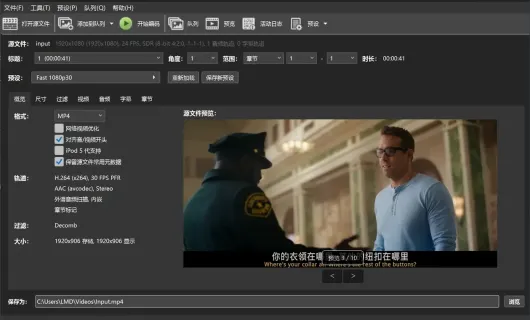
Introduction
HandBrake is a free, open-source video transcoder maintained by a community team for more than two decades, and one of the most widely used open-source ways to turn DVD/Blu-ray discs and local media files into modern formats. Everything runs locally — no upload, no watermark, no time limit, no subscription.
What it lets you do:
- Transcode discs and files: reads most common media files, DVD, Blu-ray and VIDEO_TS-style folder sources, outputting MP4, MKV or WebM.
- Rich encoder choice: H.264, H.265, MPEG-4, MPEG-2, VP8, VP9 and AV1, plus hardware-accelerated encoding (NVIDIA NVENC, AMD VCE/VCN, Intel Quick Sync, Apple VideoToolbox) to cut encoding times while keeping quality.
- Picture and quality controls: cropping, scaling, rotation/flipping, deinterlacing and IVTC with comb detection, denoise and chroma smoothing, framerate conversion and VFR handling — smaller files without losing sharpness.
- Subtitles: burn subtitles into the picture or mux them as soft tracks; reads both graphical and text subtitles from discs and accepts external subtitle files.
- Multi-audio: pick, mix down or pass through any of several audio tracks, and encode them to common audio formats for the right channel layout and loudness on each device.
- Chapters and metadata: write chapter markers and media metadata for players and TV apps that benefit from skip points.
- Streaming-friendly output: optimise MP4 for web playback (play while downloading) and produce segmented output suited to streaming.
Product highlights:
- A complete preset system: many built-in presets tuned for popular devices, resolutions and social platforms, in speed- and quality-oriented variants; save your own settings as custom presets.
- Batch workflow: a queue with multiple pending jobs, parallel encodes, pause/resume, sleep-on-finish and script notification; scan and enqueue several sources at once.
- GUI + CLI: alongside the desktop app,
HandBrakeCLIexposes the same options for scripting and headless batch jobs. - Signed releases: every asset in an official release ships with a matching
.sigfile so you can verify integrity yourself.
Limitations: HandBrake does not circumvent copy protection and cannot copy DRM-protected discs (e.g. CSS-protected commercial DVDs); it is a transcoder, not an editor — no timeline editing, effects or colour grading (hand those to LosslessCut or a proper NLE).
Platforms: Windows (x86_64 and arm64), macOS (universal), Linux (Flatpak and others).