
FigCraft
An open-source interface design app — auto layout, components with variants, design variables, prototyping and developer handoff
Note: Please open in the PC Client. Go to download >>>
Features
System Requirements
Minimum 8GB RAM. Low storage requirement (1GB reserved).
macOS 15+: Supports both Intel and M-series chips.
Windows 10/11 64-bit: No specific GPU requirements.
Screenshots
Introduction
Note: this page only catalogs third-party open-source projects and links to their official repositories; it neither develops, hosts nor distributes any software and assumes no liability. These are independent, open-source works written from the ground up, unaffiliated with and not authorized by any third-party commercial software or its maker; any third-party names, formats or trademarks are referenced for interoperability and description only.
FigCraft is a free, open-source interface design app, written independently in Rust, bringing the canvas-component-prototype workflow to both desktop and browser — it opens instantly, works offline, with no cost, no subscription and no forced network access.
What it lets you do:
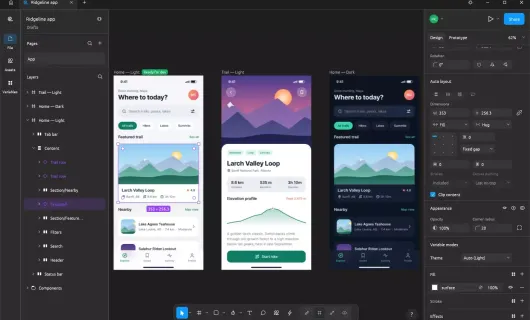
- Design interfaces and build layouts: frames, auto layout (both directions, wrap and grid, Hug/Fill/Fixed sizing), constraints and layout grids — from icons and posters to full app/web screen sets.
- Components and design systems: main components and instances whose overrides survive edits, component sets with variants, local styles and variables (color, number, string, boolean) with modes like light/dark themes — one set of color variables drives a whole UI kit.
- Vector and visual effects: real vector networks (pen/pencil, editable booleans, variable-width strokes), gradients, image fills, blend modes, shadows, blur, noise and glass; beautiful type with mixed styles and multilingual text.
- Prototype and handoff: connections, triggers and transitions for clickable prototypes with a presentation view and device frames; Dev Mode with measurements, annotations and generated CSS / HTML / React / SwiftUI code, plus export to PNG / JPG / WebP / SVG / PDF.
- Compatible with common design files (.fig): opens them best effort; SVG, PNG, JPG, WebP and PDF go in and out, so you interoperate with other people's existing assets.
Product highlights:
- Native, pure Rust: desktop all the way to the browser (WebAssembly) — no Electron, no webview wrapper; editing one node in a 20,000-node file takes a fraction of a millisecond.
- Offline and private: files are plain local archives — no account, no telemetry, nothing leaves your machine.
- Scriptable and agent-ready: every menu item, tool and drag is a command, reachable from the CLI, a JSON control channel or an MCP server for AI agents.
Team & tech: built by the community ArtCraft team (GitHub user storytold, site getartcraft.com); the Craft series is 100% pure Rust, an independent open-source work unaffiliated with any third-party commercial software.