
DeckCraft
An open-source presentation app — reads/writes .pptx with transitions and animations, presents full screen in one click.
Note: Please open in the PC Client. Go to download >>>
Features
System Requirements
Minimum 4GB RAM. Low storage requirement (1GB reserved).
macOS 15+: Supports both Intel and M-series chips.
Windows 10/11 64-bit: No specific GPU requirements.
Screenshots
Introduction
Note: this page only catalogs third-party open-source projects and links to their official repositories; it neither develops, hosts nor distributes any software and assumes no liability. These are independent, open-source works written from the ground up, unaffiliated with and not authorized by any third-party commercial software or its maker; any third-party names, formats or trademarks are referenced for interoperability and description only.
DeckCraft is a free, open-source presentation / slide-show app, written independently in Rust, bringing "build a deck, present a deck" to both desktop and browser — no cost, no subscription, no forced network access.
What it lets you do:
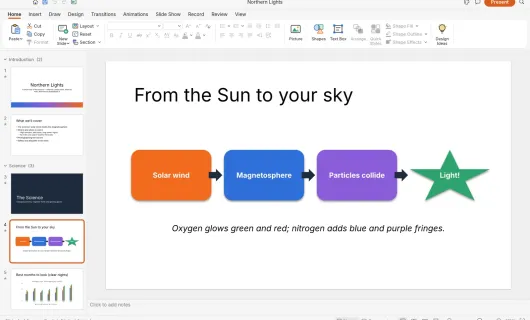
- Build a full deck: themes, layouts, shapes, pictures, tables and charts, plus slide transitions and element animations, then present it full screen.
- Compatible with common presentation formats (.pptx): open and keep editing these presentations, so you interoperate with other people's existing decks.
- Familiar panels and workflow: a ribbon, slide thumbnails with sections, a canvas, notes and a status bar that follow mainstream presentation-app habits, so the learning cost is near zero.
Product highlights:
- Native, pure Rust: an egui interface, covering everything from desktop to the browser — not a webview wrapper.
- Scriptable and agent-ready: every button is a command, reachable from the UI, CLI, a JSON control channel or an MCP server for AI agents to generate and edit slides in bulk.
Team & tech: built by the community ArtCraft team (GitHub user storytold, site getartcraft.com); the Craft series is 100% pure Rust, an independent open-source work unaffiliated with any third-party commercial software.
Platforms: macOS, Windows, Linux, FreeBSD, and a browser (WebAssembly) build. Currently in early development.